.svg)
SIGN UP FOR JUICEBOX (IT’S FREE!)

Who are you looking for?
Thank you! Your submission has been received!
Oops! Something went wrong while submitting the form.

A Candidate Relationship Management (CRM) in recruiting is a system for proactively building and nurturing long-term relationships with potential hires—even before a job opening exists. It fundamentally shifts hiring from a reactive, transactional process to a strategic, relationship-driven one.
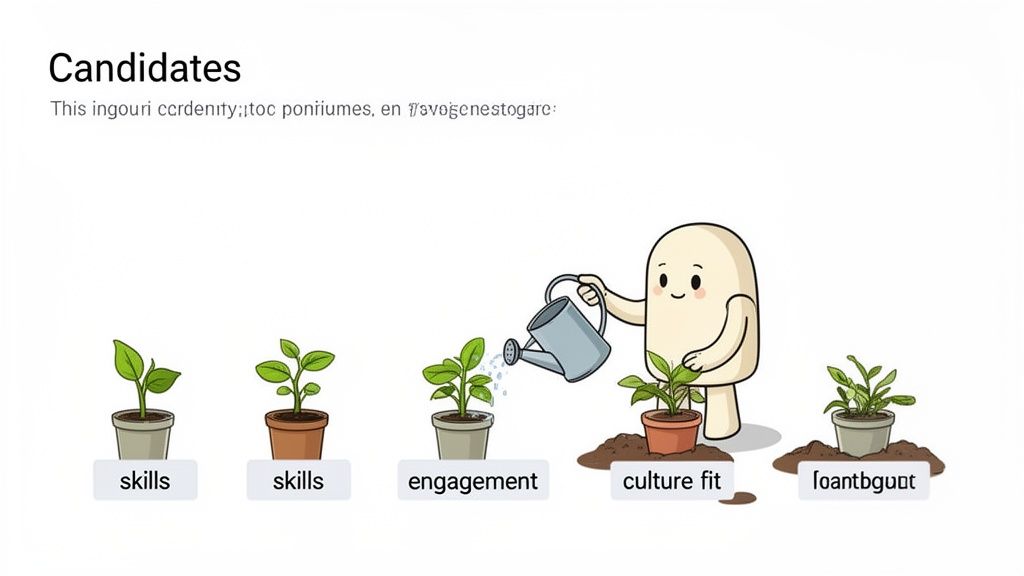
Think of it less as a filing cabinet for résumés and more as a talent garden you cultivate over time. This proactive approach is the single biggest advantage you can build. It's how modern teams get ahead of hiring needs, turning talent acquisition into a predictable, strategic asset instead of a reactive cost center. And the key benefit? It ensures you’re always talking to warm, engaged candidates, not starting from scratch with cold outreach.
Forget the frantic scramble every time a new role opens. Most companies believe the biggest hiring challenge is finding talent. The opposite is true. The real challenge is building relationships before you need them. The old model of posting a job and praying for the right applicants is broken. It’s reactive, inefficient, and leaves you at the mercy of who happens to be looking for a job right now.
Here’s the bottom line: a recruiting CRM changes the game entirely. It moves your team from "hunting" for individual candidates to "cultivating" a ready-made pipeline of talent.
Instead of starting every search from scratch, you tap into a warm pool of talent that already knows and respects your brand. The core pains of reactive hiring—wasted effort, sky-high costs, and missing out on top-tier candidates who aren't actively job hunting—get replaced by a system of continuous engagement.
This proactive approach is quickly becoming a necessity. The Recruiting CRM market was valued at USD 321 million in 2023 and is projected to explode to USD 564.56 million by 2032, according to DataInsightsMarket.com. Why the massive growth? Teams are drowning in applications, and modern CRMs with AI are boosting matching accuracy by 40%, slashing time-to-hire.
But there's a common confusion that trips up most talent teams.
You might be thinking, "Isn't this what our Applicant Tracking System (ATS) is for?"
That's a critical misunderstanding. An ATS is a reactive tool for managing active applicants for a specific, open job. It’s a workflow machine. A recruiting CRM, on the other hand, is a proactive relationship engine for all potential talent, both active and passive. For a deeper breakdown, check our guide on what an ATS is.
A modern CRM is all about nurturing those relationships over the long haul. You're not just tracking applicants; you're building a community.
So, how do these two systems really differ in practice?
Let's break it down. While both are crucial, they serve distinct purposes. One is for managing applications for today's jobs; the other is for building relationships for tomorrow's.
Here’s a simple way to think about it: your ATS is a filing cabinet, while your CRM is a talent garden.
DimensionRecruiting CRM (Talent Garden)ATS (Filing Cabinet)Primary GoalProactively build & nurture relationships with passive and active talent for future roles.Reactively process & manage active applicants for current, open jobs.FocusLong-term relationship building and candidate engagement.Short-term workflow management and compliance tracking.Key UsersSourcers, talent acquisition leaders, and relationship-focused recruiters.Recruiters, coordinators, and hiring managers focused on an active process.Candidate TypeAll potential candidates: passive leads, silver medalists, event attendees, referrals.Only active applicants who have formally applied to a specific job requisition.Core FunctionalityEmail nurturing campaigns, talent pooling, event management, advanced search.Job posting, application intake, interview scheduling, offer management.Strategic ValueCreates a sustainable competitive advantage through a pre-built talent pipeline.Ensures an organized, efficient, and compliant hiring process for open roles.
Ultimately, using a recruiting CRM means you're always prepared. It transforms your talent acquisition function from a cost center that just reacts to business needs into a strategic asset that anticipates them. It’s a core part of any strategy to streamline the recruitment process.
Every recruiter has heard it. "We have no pipeline for this senior engineering role." It signals a long, expensive, and stressful search is about to begin.
But here’s the thing: Most companies that believe in the "empty pipeline" myth are wrong. Your pipeline isn't actually empty; it's just fragmented, invisible, and scattered across a dozen disconnected systems.
It’s hiding in your recruiters' inboxes, forgotten spreadsheets, and past ATS applicants. A CRM in recruiting is the central talent hub that unifies these sources into a single, powerful asset. It’s the system that proves the pipeline was there all along.
This changes the game. You can start building talent pools for roles you know you'll need in the next six to twelve months. Think of it as creating a bench of pre-vetted, engaged candidates waiting for the call. For a deeper look, check our guide on how to build a talent pipeline.
Now, you might be thinking, "This sounds great, but building and maintaining a talent pool takes way too much time." The old way, yes. Sourcing, verifying, and tagging thousands of candidates is a monumental task. The initiative usually dies because the manual effort outweighs the perceived benefit.
That objection, however, is based on the old way of doing things. Modern AI sourcing platforms completely change the equation. For example, Ramp used an integrated AI sourcing and CRM workflow to slash their sourcing time by a staggering 80%. They didn't just work faster; they achieved a 3x higher reply rate by engaging a pre-warmed pipeline.
This is the key. You don't build the pipeline by hand anymore. You let AI populate it for you.
One of the most overlooked sources of talent is your database of past applicants. These are people who were interested enough to apply once and often include "silver medalists"—excellent candidates who were a close second for a previous role.
A recruiting CRM helps you tap into this goldmine. Here's how:
Java, React, AWS) or custom tags like silver-medalist-eng or referral-q3.Here is an example of how you can organize projects within a modern platform to track different talent pipelines.
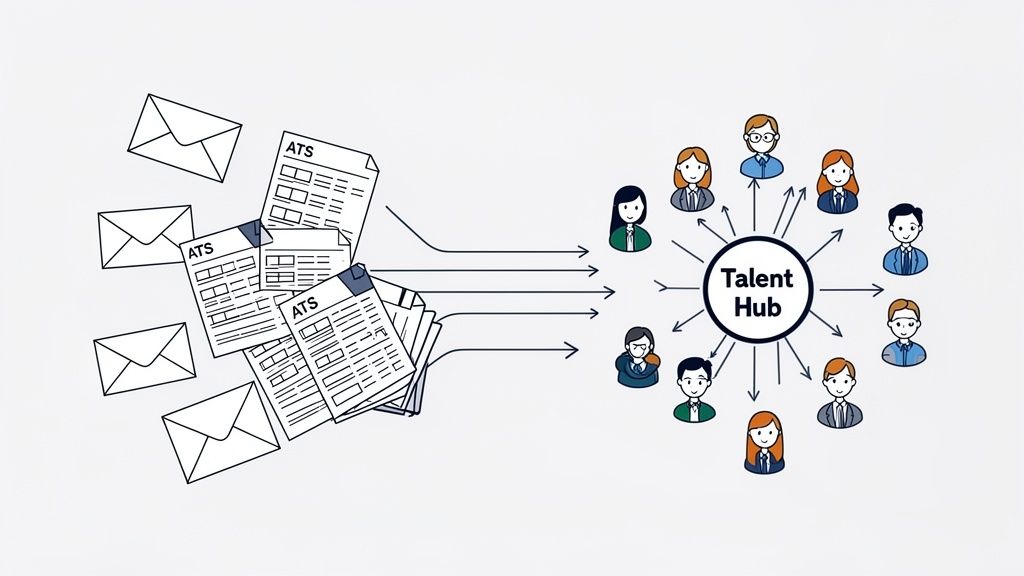
This kind of organization gives recruiters instant access to curated lists. Ultimately, this unlocks the ability to fill roles faster and at a much lower cost. According to research from Zippia, hiring from your existing talent pool can reduce time-to-hire by over 50%.
A modern CRM in recruiting is more than a digital Rolodex. It’s a command center packed with tools to automate tasks and deepen relationships. The best platforms are designed around the core jobs recruiters need to do, turning manual chores into strategic workflows.
Let's look at the functions that actually move the needle.
One of the biggest struggles is simple consistency. It's impossible to manually keep in touch with thousands of promising candidates. This is where automated nurture campaigns become your secret weapon.
Instead of letting great connections go cold, you can build multi-step email sequences that kick off based on specific tags or actions.
This systematic approach turns a static list of contacts into an engaged community that's ready for your next big role. There are several great AI recruiting tools that can power this.
Pattern Interrupt: Think about your last "hard-to-fill" role. How many past applicants or silver medalists already in your ATS could have been a perfect fit if you'd just stayed in touch? A CRM turns that missed opportunity into your primary sourcing channel. Too many recruiters spend hours on external sites while their best candidates are already in their database, completely ignored.
The real power of a unified talent hub is its searchability. But there's a problem most tools ignore: simple keyword matching isn't enough. Modern CRMs go way beyond that, letting you layer multiple filters to pinpoint the ideal candidate in seconds.
The most expensive hire is the one you already knew but couldn't find. A CRM with powerful, semantic search stops you from paying agency fees to find people already in your network.
Here's an example showing how advanced power filters can instantly surface ideal candidates within a pipeline.
This screenshot shows how you can combine filters like "career progression," "founder experience," and "diversity" to get a highly curated list in a snap. It's about finding needles in your own haystack.
Gut feeling has its place, but data wins. A key function of a CRM in recruiting is providing actionable talent analytics that show you what's working.
Key reports often include:
This data lets you double down on effective strategies. For instance, after analyzing their outreach data, Quora’s recruiting team used their CRM to refine email copy, which led to a 4x increase in candidate response rates in just a few weeks. That’s proof that small, data-informed tweaks can produce massive results.
Knowing what a CRM in recruiting can do is one thing. Actually connecting its features into a powerful, automated system is another. The magic happens when you integrate your CRM with a modern AI sourcing platform, creating a seamless workflow that takes candidates from discovery to engagement without the manual drag.
This is the system that attacks the biggest time-sucks for recruiters: manual sourcing, contact info scavenger hunts, and data entry.
Let’s walk through the modern, four-step process.
Forget clunky Boolean strings. The workflow kicks off by using a simple, natural language prompt in an AI sourcing tool to find ideal candidates across dozens of platforms.
For example, a recruiter might type:
"Find me senior software engineers in the Bay Area who have previously worked at a top 10 AI lab and have experience scaling products from 0 to 1 million users."
In seconds, the AI scans millions of profiles to generate a curated shortlist.
This next step is crucial. Before a single email is sent, the AI sourcing platform verifies the contact information for every candidate on your shortlist.
This eliminates the guesswork and bounce-backs that plague traditional outreach. Clean, verified data is the foundation of any successful engagement campaign and ensures the data hitting your CRM is accurate.
Pattern Interrupt: Most recruiting teams still operate in silos. A sourcer finds a profile on LinkedIn, copies data to a spreadsheet, hands it to a recruiter who hunts for an email, and then finally adds them to the CRM. This clunky process is slow and kills momentum. An integrated workflow collapses these steps into minutes.
Once you have a curated, verified list, you export them directly into your recruiting CRM with a single click.
But this isn't just a data dump. As you export, you can add crucial tags and assign candidates to specific talent pools right away.
Project: Senior AI Engineer Q4Tag: Bay AreaTag: Ex-OpenAITalent Pool: AI R&DThis screenshot shows how easily a sourced list can be moved into a project.
This step ensures every profile enters your CRM loaded with rich context, making them instantly searchable.
With new candidates organized in the CRM, the final step is to launch a personalized, multi-step email sequence. This automated campaign handles the initial outreach and follow-ups, engaging candidates at scale.
This integrated system is how fast-growing companies win. Just look at Ramp. They streamlined this exact process and slashed their sourcing time by a staggering 80%. Even better, by engaging warm candidates, they increased their reply rates by 3x. It’s proof that this workflow delivers.
The impact is undeniable. CRM adoption has hit 91% for companies with over 10 employees, driven by an average 30x ROI, according to Digitalgyd.com. The combination of AI sourcing and a robust CRM in recruiting creates a powerful engine for building a sustainable talent advantage.
Investing in a new recruiting CRM is one thing. Proving it was worth the money is another.
Your executive team doesn't care about vanity metrics. They want to see the bottom-line impact. How is this software helping us hire better people, faster, and for less money?
This is where you shift the conversation from activity to outcomes. A great CRM gives you the data to connect your team's work directly to hiring wins. You just need to track the right KPIs.
The data backs this up. With real-time KPI tracking, 70% of professionals report working faster. Good CRMs even use predictive analytics to help fill roles 28% quicker. You can discover more insights about these CRM trends at Hirebee.ai.
So, what should you be measuring?
This is the big one. It measures how many candidates from your talent pool move into an active hiring process. It's the ultimate test of your CRM's engagement power.
A high conversion rate proves you're not just hoarding contacts—you're building real relationships.
Pattern Interrupt: Most recruiting teams celebrate when they source a hundred new profiles. But a CRM shows that’s just step one. Without a system to nurture relationships and track engagement, that list is just a list. The real value is measured when those sourced candidates become interviewed candidates, and eventually, new hires.
How much faster can you fill a role when pulling from your CRM versus starting from scratch? This is your most powerful ROI metric.
It isolates the speed advantage you get from having a warm, engaged pipeline ready and waiting.
This speed comes from a simple, repeatable workflow.
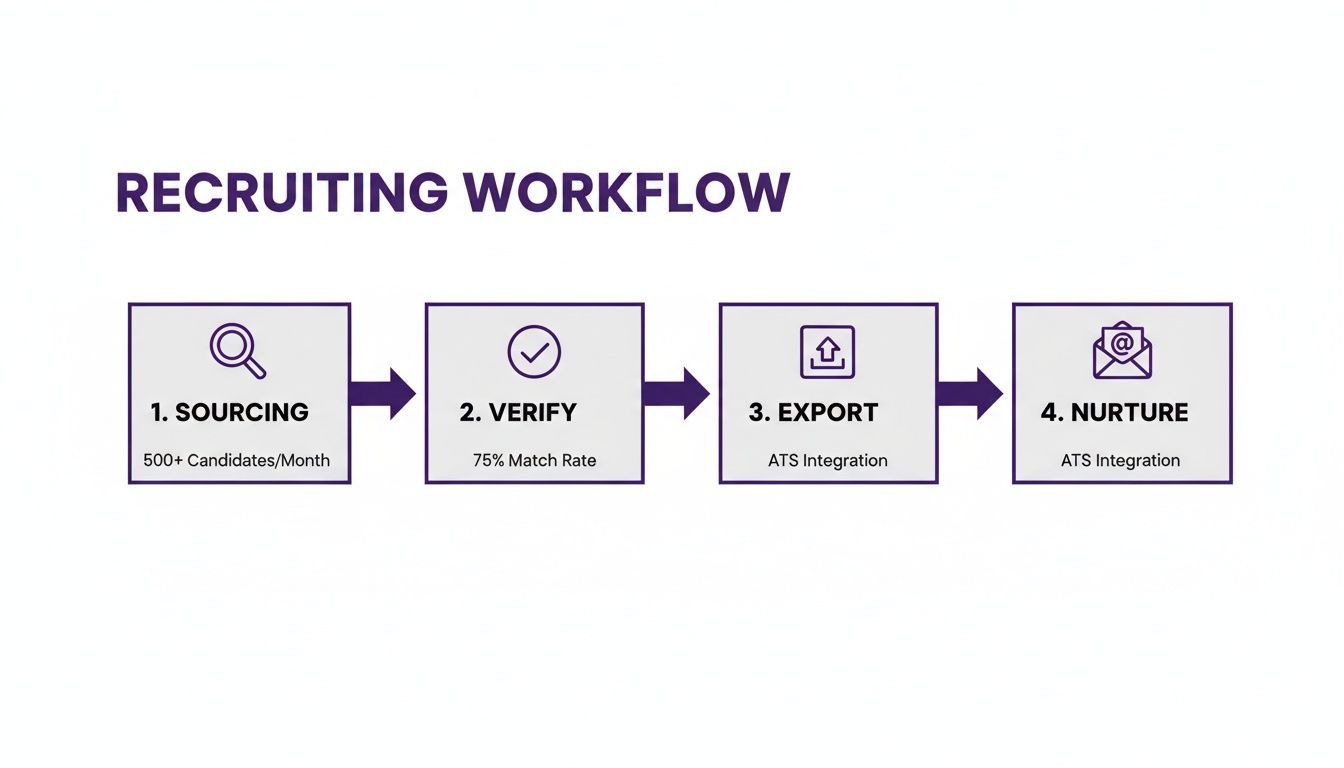
This four-step process—sourcing, verifying, exporting, and nurturing—is the engine that drives down your time-to-fill.
Finally, the money. This metric puts the cost of hiring from your nurtured talent pool head-to-head against pricey alternatives like agencies.
To get a complete picture, you can also check out our guide on improving quality of hire.
Here’s a quick-reference table of the metrics that prove your CRM's worth.
MetricHow to Calculate ItWhat It Tells YouPipeline Conversion Rate(Hires from CRM / Total Candidates in Pool) x 100The quality and engagement level of your talent pool.Time-to-Fill (CRM vs. Other)Avg. Days from Req Open to Offer Accept (CRM Hires)The speed and efficiency gains from having a warm pipeline.Sourcing Cost Per HireTotal Internal Costs vs. External Agency/Ad SpendThe direct, hard-dollar savings your CRM is generating.
By focusing on these three core areas, you can build an undeniable business case for your recruiting CRM.
A new CRM in recruiting promises a world of proactive pipelines. But the road from buying the software to getting value is full of potholes. A shiny new tool is worthless if it's built on a shaky foundation.
The biggest mistake? The classic "garbage in, garbage out" problem. If you migrate dirty, outdated data from old spreadsheets or a clunky ATS, you’ve shot yourself in the foot. Your team will lose faith fast when they're staring at bounced emails and incorrect profiles.
Don't fall into the trap of thinking your old data is "good enough." It creates friction and kills trust.
Moving over from legacy systems doesn't have to be a nightmare. The trick is to be ruthless about data quality before you import a single contact.
skill-python or location-sf-bay-area. This makes your CRM instantly useful.But there's a problem most people ignore: even with clean data, your new CRM can fail if it feels like more work. If recruiters have to manually copy-paste profiles between their sourcing tools and the CRM, they just... won't. This is where seamless integration stops being a "nice-to-have" and becomes a deal-breaker. According to Phenom, one-click exports and automatic data syncing are crucial.
Even with perfect data and slick integrations, your CRM is dead if the team doesn't use it. The number one reason is that individual recruiters don't see what's in it for them.
Don't just train your team on how to use the CRM. Train them on why. Show them how a specific workflow—like finding five silver-medalist candidates for their open role in 30 seconds—directly helps them hit their targets faster.
Focus on workflows, not just features. Run a hands-on workshop where you build a pipeline for a current, hard-to-fill role using the CRM. When recruiters see the tool solving their immediate headaches, adoption becomes a no-brainer. This is how some of the best sourcing tools for recruiters get adopted.
What's the main difference between a recruiting CRM and an ATS?
An ATS manages active applicants for open jobs now. A CRM proactively builds relationships with all potential candidates for future roles.
How long does it take to build a useful talent pool in a CRM?
Manually, it takes months. But with modern AI sourcing tools, you can populate your CRM with thousands of verified candidates in just a few hours.
Can a small startup benefit from a recruiting CRM?
Yes. It helps small teams punch above their weight by building a strong talent pipeline early, saving massive time and agency fees as the company grows.
At its core, a recruiting CRM is about flipping the hiring model on its head. It’s the difference between owning a farm and constantly having to hunt for your next meal. You're not just hiring; you're cultivating a private, engaged network of top-tier talent that already knows and respects your brand.
What this really unlocks is freedom from the stressful, reactive cycle of just filling empty seats. It empowers your team to get ahead of the business's hiring needs, becoming true talent advisors instead of requisition fillers.
{{large_cta}}
Run your first search for free. Find and engage top talent across 800M+ profiles. Trusted by 5,000+ customers.